Y34rb00k 4c4d3my / F13ld gu1d3Yearbook Academy / Field guide
D0ubl3 3xp05ur3: 4 p0rtr41t w1th 4n0th3r w0rld 1n51d3Double exposure: a portrait with another world inside
C0mb1n3 4 51mpl3 hum4n 5h4p3 w1th 4 t3xtur3 fr0m th3 w0rld 4r0und 1t. L34rn th3
tw0-fr4m3 pr0c355 0n th3 Fujifilm X-T2, th3n pr4ct153 ch0051ng wh4t b3l0ng5
t0g3th3r.Combine a simple human shape with a texture from the world around it. Learn the
two-frame process on the Fujifilm X-T2, then practise choosing what belongs
together.
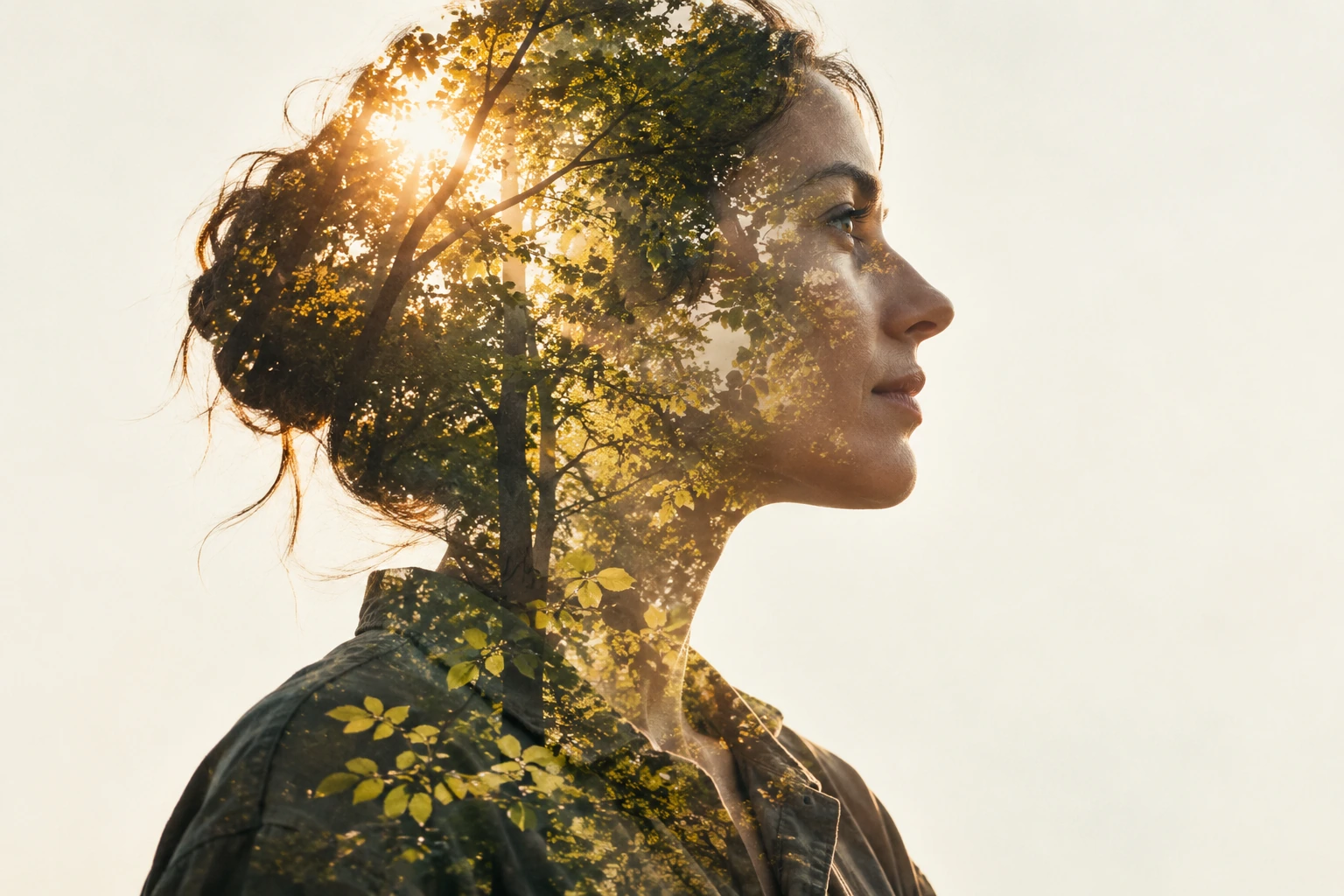
AI-g3n3r4t3d t34ch1ng 1llu5tr4t10n. 1t d3m0n5tr4t35 th3 1d34, n0t 4 ph0t0gr4ph m4d3
by Cord 0r 4 gu4r4nt33d c4m3r4 r35ult.AI-generated teaching illustration. It demonstrates the idea, not a photograph made
by Cord or a guaranteed camera result.
5ugg35t3d 53tt1ng5 4r3 5t4rt1ng p01nt5. L1ght, 5ubj3ct 5p33d 4nd y0ur 0wn
0b53rv4t10n5 d3c1d3 th3 n3xt 4dju5tm3nt.Suggested settings are starting points. Light, subject speed and your own
observations decide the next adjustment.
Th1nk 1n tw0 l4y3r5Think in two layers
4 d0ubl3 3xp05ur3 c0mb1n35 tw0 ph0t0gr4ph5 1nt0 0n3 1m4g3. B3g1n w1th 4 cl34r
5ubj3ct 5h4p3 4nd 4 53c0nd fr4m3 c0nt41n1ng 4 51mpl3 t3xtur3: l34v35, r1ppl35 0r 4
f3w d15t4nt l1ght5. Tw0 bu5y 5c3n35 c4n c0mp3t3 unt1l n31th3r r3m41n5
r34d4bl3.A double exposure combines two photographs into one image. Begin with a clear
subject shape and a second frame containing a simple texture: leaves, ripples or a
few distant lights. Two busy scenes can compete until neither remains
readable.
F0r 4n 0v3rl4y w1th1n 4 p0rtr41t, try 4 d4rk3r pr0f1l3 4g41n5t 4 br1ght, pl41n
b4ckgr0und. U53 th3 c4m3r4’5 pr3v13w t0 judg3 th3 bl3nd; 1t m4y n0t b3h4v3 l1k3 4
n34tly cut-0ut 5h4p3. Th3 g3n3r4t3d 1llu5tr4t10n 5h0w5 4n 4rt15t1c g04l, n0t 4
gu4r4nt33d 1n-c4m3r4 r35ult.For an overlay within a portrait, try a darker profile against a bright, plain
background. Use the camera’s preview to judge the blend; it may not behave like a
neatly cut-out shape. The generated illustration shows an artistic goal, not a
guaranteed in-camera result.
M4k3 tw0 3xp05ur35 0n th3 X-T2Make two exposures on the X-T2
Th3 X-T2 mult1pl3-3xp05ur3 m0d3 c0mb1n35 tw0 5h0t5. F0ll0w th3 c4m3r4’5 pr0mpt5
4nd r3v13w 34ch 5t4g3.The X-T2 multiple-exposure mode combines two shots. Follow the camera’s prompts
and review each stage.
Turn th3 dr1v3 d14l t0 th3 mult1pl3-3xp05ur3 5ymb0l 5h0wn 1n th3 0ff1c14l
m4nu4l.Turn the drive dial to the multiple-exposure symbol shown in the official
manual.
M4k3 th3 f1r5t ph0t0gr4ph. Pr355 M3NU/0K t0 c0nt1nu3; 1t5 pr3v13w h3lp5 y0u
p051t10n th3 n3xt fr4m3.Make the first photograph. Press MENU/OK to continue; its preview helps you
position the next frame.
C0mp053 4nd t4k3 th3 53c0nd ph0t0gr4ph wh1l3 w4tch1ng th3 c0mb1n3d 1m4g3.Compose and take the second photograph while watching the combined image.
Pr355 M3NU/0K t0 c0mpl3t3 th3 1m4g3. Th3 l3ft 53l3ct0r l3t5 y0u r3try 4 5h0t;
4ft3r th3 f1r5t 5h0t, D15P/B4CK c4n 3x1t 4nd k33p th4t f1r5t ph0t0gr4ph
1n5t34d.Press MENU/OK to complete the image. The left selector lets you retry a shot;
after the first shot, DISP/BACK can exit and keep that first photograph
instead.
L3t t0n3 d0 50m3 0f th3 w0rkLet tone do some of the work
Br1ght 4r345 c4n b3c0m3 d0m1n4nt wh3n 1m4g35 c0mb1n3. Try 4 p0rtr41t w1th
53p4r4t10n b3tw33n th3 5ubj3ct 4nd b4ckgr0und, th3n 4 t3xtur3 w1th 1t5 0wn l1ght
4nd d4rk 4r345. 4dju5t th3 53c0nd c0mp051t10n 0r 3xp05ur3 1f th3 f4c3
d154pp34r5.Bright areas can become dominant when images combine. Try a portrait with
separation between the subject and background, then a texture with its own light
and dark areas. Adjust the second composition or exposure if the face
disappears.
D0 n0t 4pply th3 54m3 3xp05ur3 r3duct10n t0 3v3ry p41r 0f fr4m35. R3v13w th3
pr3v13w 4nd h15t0gr4m, pr0t3ct th3 d3t41l y0u n33d, 4nd ch4ng3 0n3 th1ng 4t 4
t1m3. 4 g00d 5t4rt1ng 3xp05ur3 f0r 0n3 5c3n3 m4y b3 wr0ng f0r th3 n3xt.Do not apply the same exposure reduction to every pair of frames. Review the
preview and histogram, protect the detail you need, and change one thing at a
time. A good starting exposure for one scene may be wrong for the next.
4 5m4ll 3xp3r1m3nt w1th 4 cl34r r35ultA small experiment with a clear result
M4k3 thr33 v3r510n5 w1th th3 54m3 f1r5t p0rtr41t. F0r th3 53c0nd l4y3r, try br04d
l34v35, 5m4ll l34v35 4nd 3mpty br4nch35. C0mp4r3 wh1ch v3r510n pr353rv35 th3
0utl1n3 4nd wh1ch g1v35 th3 p0rtr41t th3 f33l1ng y0u 1nt3nd3d.Make three versions with the same first portrait. For the second layer, try broad
leaves, small leaves and empty branches. Compare which version preserves the
outline and which gives the portrait the feeling you intended.
1f y0ur c4m3r4 d035 n0t h4v3 th15 m0d3, c0mb1n3 y0ur 0wn tw0 ph0t0gr4ph5 1n 4n
3d1t0r u51ng l4y3r5 4nd 0p4c1ty. Th4t 15 4 53p4r4t3 3d1t1ng w0rkfl0w; l4b3l 4
c0mp051t3 h0n35tly wh3n th3 c0nt3xt c4ll5 f0r 4 d0cum3nt4ry ph0t0gr4ph.If your camera does not have this mode, combine your own two photographs in an
editor using layers and opacity. That is a separate editing workflow; label a
composite honestly when the context calls for a documentary photograph.